



If you're switching from ManyChat to a tool built for Instagram, this is the moment most people dread:
"What if I break the flows that are actually making me money?"
It's a fair worry. And the way migrations usually break isn't loud. It looks like this:
Someone comments "LINK" on your reel.
The public reply shows up under their comment.
The DM never arrives.
No error. No warning. Just leads quietly disappearing until someone notices.
That happens because of one Meta rule. Once you know it, switching from ManyChat to Instagram DM automation with LinktoDM is an afternoon's work, and nothing gets lost.
The One Rule Behind Every Broken Migration
Instagram lets one app at a time handle the DMs on your account. Whichever app owns the conversation gets to reply. Every other app waits.
So "keep ManyChat on as a backup" doesn't work. ManyChat keeps the conversations, and your new automation posts the public reply, which doesn't need ownership, and then fails on the DM, which does.
That's also why disabling ManyChat isn't enough. A disabled channel can still hold its permissions on your account. You have to remove it.
How to Migrate From ManyChat Without Losing Your Flows
Five steps. The order matters more than the speed.
Step 1: Screenshot every flow before you touch anything
When you remove Instagram from ManyChat, your automations stop and your Instagram contacts are deleted. ManyChat warns you that you won't be able to restore them.
So before anything else, open each live Instagram automation and capture the trigger, keywords, public reply, DM copy, buttons, links and follow-ups. If you collected emails or phone numbers, export them now.
While you're there, be ruthless. Most accounts find that three to seven flows do nearly all the work. Rebuild those. Leave the dead campaigns behind.
Step 2: Remove ManyChat everywhere it's connected
In ManyChat, go to Settings → Channels → Instagram and choose Remove Instagram Account from Manychat, not Disable.
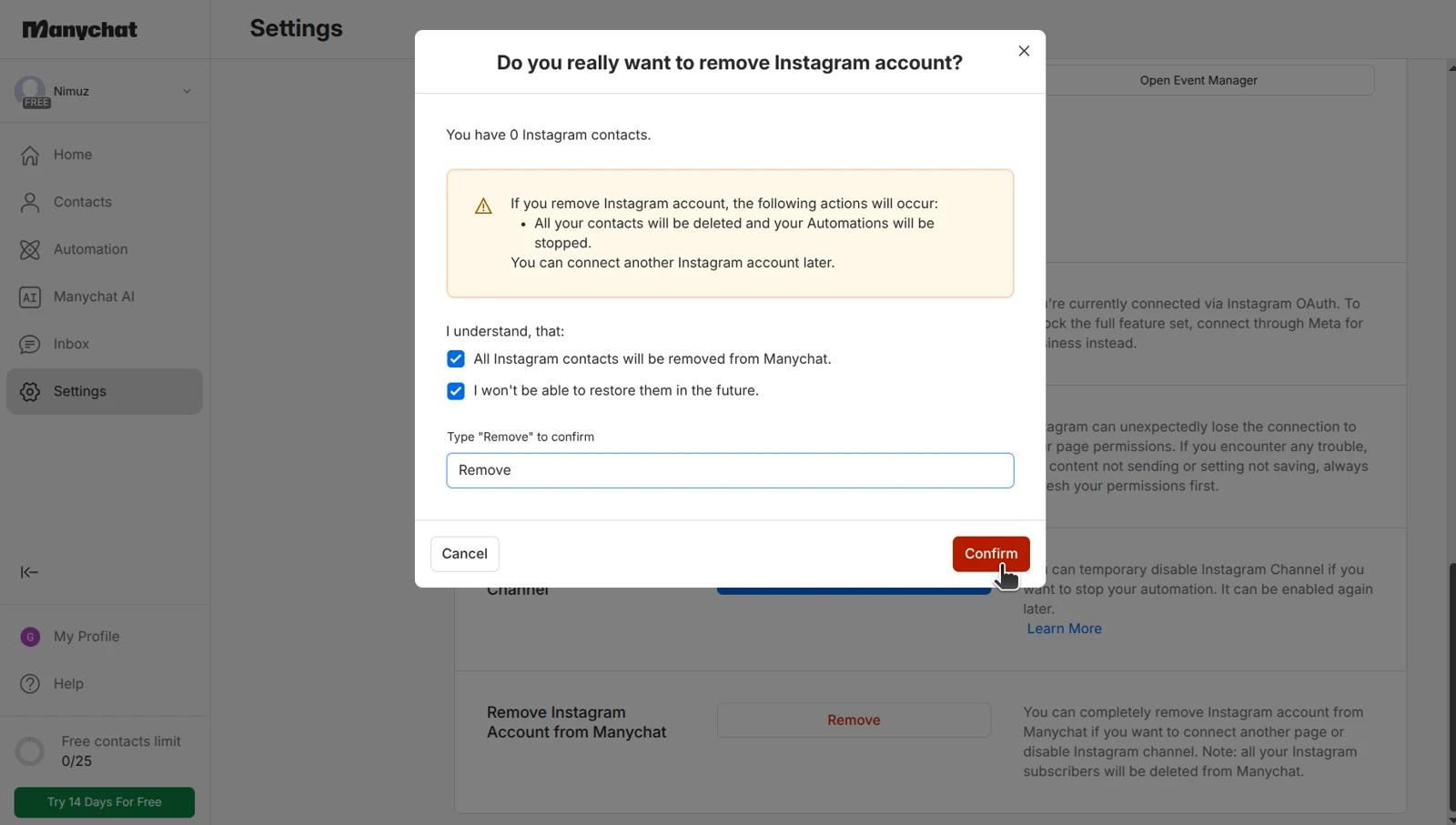
Then remove Manychat-IG from Instagram's own app list: Settings and activity → App website permissions → Apps and websites. Both removals are shown in the Instagram disconnect guide.
If your Instagram is linked to a Facebook Page, ManyChat is connected there too: in your Business integrations, in the Page's Connected Apps, and sometimes as its default routing app. Clear all three. The Facebook disconnect guide shows exactly where each one lives.
Step 3: Connect Instagram to LinktoDM
Sign up at console.linktodm.com and connect your Instagram account, through Instagram or Facebook. Your Instagram needs to be a Creator or Business account, which it already is if ManyChat was running on it. Instagram login needs no Facebook Page at all. Either way, it's Meta's official login, so you never share your password.
Approve every permission, especially messaging and comments. Then verify the switch: LinktoDM should be the only app left in those lists.
Step 4: Rebuild your top flows and test them
Your screenshots turn this into copy-paste. Almost everything maps across directly: comment-to-DM keywords, public replies, the opening DM, buttons, follow-ups, delays, story replies, DM keywords, and multi-step flows in Flow Builder.
If the old flow was basically "comment LINK, get the link", rebuild it as a regular post automation. It handles the public reply, the DM, follow-ups and delays on its own. Use Flow Builder only when the ManyChat canvas branched: qualification questions, or different paths for different answers.
Fix one thing while you're rebuilding: don't send everyone the same line. Add two or three message variations, or let AI write the public replies, so a reel with hundreds of comments doesn't fill up with identical, robotic replies.
Then test each flow from a second Instagram account. Instagram won't DM you about your own comment, so testing from the connected account looks broken even when it isn't. Once your comment flows work, move the rest across: DM keywords, story replies and mentions, and any automations on boosted posts or ads.
Step 5: Backtrack the comments you missed
Anyone who commented between removing ManyChat and going live on LinktoDM got nothing.
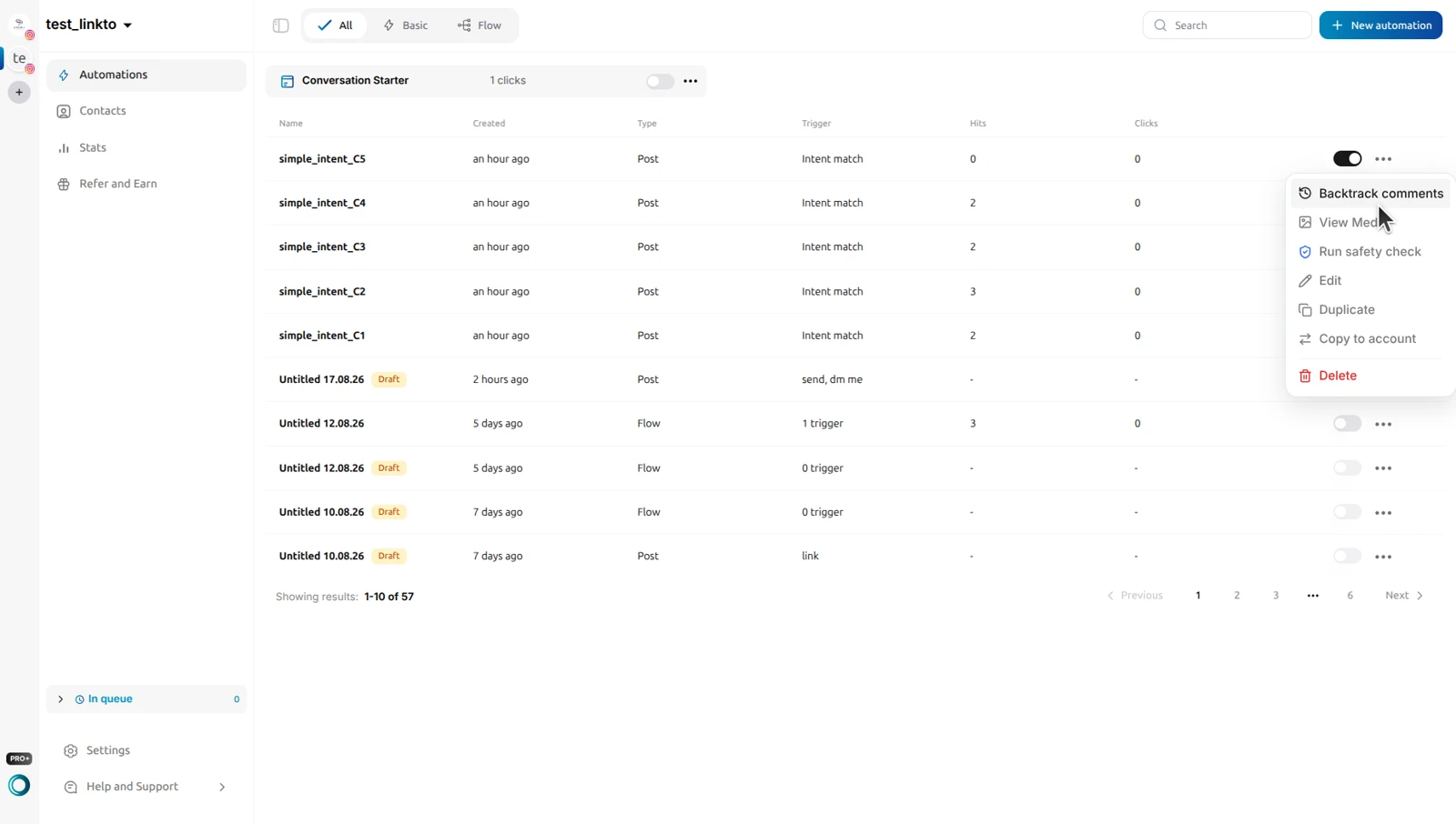
Open the automation's menu, choose Backtrack comments, and click Backtrack Now. LinktoDM checks eligible comments from the last 7 days against your trigger and replies to the ones that match, threaded under the original comment.
That's it.
- No flows lost.
- No two apps fighting over the same DMs.
- No commenter left waiting because you switched mid-campaign.
What Switching Looks Like in Practice
Say you run four ManyChat flows: a free guide on "GUIDE", a product link on "PRICE", a story reply, and a DM keyword for bookings.
On Sunday evening you screenshot all four. On Monday at a quiet hour, you remove ManyChat, connect LinktoDM, and rebuild the two comment flows first, because they bring in the most leads. You test both from a friend's account, then backtrack the reel that picked up comments while you were switching. The story and booking flows follow later that day.
Over the next few days, you add Ask to Follow and follow-ups, keep an eye on the DMs, and delete the ManyChat account once everything has run cleanly for about a week.
Your audience never notices you switched. They just keep getting their links.
Not sure which flows to build beyond the basics? Here are 10 types of Instagram DM automation and what each one is good for.
Instagram DM Automation Features ManyChat Doesn't Have
Ask to Follow
If "follow me for the link" was already in your captions, make it automatic. LinktoDM checks that the person actually follows you before it sends the DM. How Ask to Follow works →
Intent Match
Instead of listing every spelling of "price", describe what the comment should mean. "How much?", "cost?" and "rate pls" all fire the same DM. How Intent Match works →
One automation for every post
Point a single automation at all your posts and reels, or at your next post, instead of building one rule per post. Choosing which posts to automate →
Backtrack
Your safety net for this switch, and for every reel that takes off before you've set anything up. Here's how to use it to automate comments on a reel that's already live.
Before You Switch
Three things to know:
- Keep your ManyChat account for a few days. Remove Instagram from it, but don't delete the account until your new flows have run cleanly. It's your way back if something goes wrong.
- Backtrack only after testing, and keep it gentle. Backtracking a broken automation sends the wrong DM to everyone who commented that week. It also answers a week of comments in one go, so on a busy post, set a low public reply limit for that first run.
- WhatsApp, SMS and email broadcasts don't move across. LinktoDM is built for Instagram. If ManyChat runs those for you too, they need a separate plan. The LinktoDM vs ManyChat comparison lays out the difference.
What Changes on Your Bill
ManyChat prices its paid plans by contact count, so your bill grows as your audience does, even if every one of those contacts only ever talks to you on Instagram.
LinktoDM's Free plan needs no card and doesn't expire, and it's enough to run a real comment-to-DM funnel. Check current plans on the pricing page.
Frequently Asked Questions
Can I import my ManyChat flows into LinktoDM?
No. No tool can import ManyChat flows, so you rebuild them from your screenshots. Most flows map across step for step.
Can I run ManyChat and LinktoDM on the same Instagram account?
Not reliably. Instagram lets one app own a conversation at a time, so the DMs fail while ManyChat is still connected.
Do I need a Facebook Page?
No. You can connect LinktoDM with your Instagram login alone.
Will I lose my followers or past DMs?
No. Followers and DM threads live on Instagram, not inside ManyChat. What you lose is ManyChat's automations and contact records, which is why you screenshot and export first.
Is LinktoDM a full ManyChat replacement?
For Instagram comment, story and DM automation, yes. For WhatsApp, SMS or Telegram, no. If you need those, ManyChat is still the better fit.
How long does switching take?
For a creator with a handful of flows, usually an afternoon. Agencies should switch one client account at a time.
- See which LinktoDM feature replaces each ManyChat one →
- Fix the "not the thread owner" error →
- Compare the best ManyChat alternatives →
- See LinktoDM pricing →
Your Flows Are Worth Moving Properly
You built them because they work. Switching tools shouldn't cost you the leads they bring in.
Screenshot the flows. Remove ManyChat properly. Rebuild, test, and backtrack.

'%3e%3cpath%20d='M14.8156%200H1.18125C0.528125%200%200%200.515625%200%201.15313V14.8438C0%2015.4813%200.528125%2016%201.18125%2016H14.8156C15.4688%2016%2016%2015.4813%2016%2014.8469V1.15313C16%200.515625%2015.4688%200%2014.8156%200ZM4.74687%2013.6344H2.37188V5.99687H4.74687V13.6344ZM3.55938%204.95625C2.79688%204.95625%202.18125%204.34062%202.18125%203.58125C2.18125%202.82188%202.79688%202.20625%203.55938%202.20625C4.31875%202.20625%204.93437%202.82188%204.93437%203.58125C4.93437%204.3375%204.31875%204.95625%203.55938%204.95625ZM13.6344%2013.6344H11.2625V9.92188C11.2625%209.0375%2011.2469%207.89687%2010.0281%207.89687C8.79375%207.89687%208.60625%208.8625%208.60625%209.85938V13.6344H6.2375V5.99687H8.5125V7.04063H8.54375C8.85938%206.44063%209.63438%205.80625%2010.7875%205.80625C13.1906%205.80625%2013.6344%207.3875%2013.6344%209.44375V13.6344Z'%20fill='%23B1B1B1'/%3e%3c/g%3e%3cdefs%3e%3cclipPath%20id='clip0_6304_15414'%3e%3crect%20width='16'%20height='16'%20fill='white'/%3e%3c/clipPath%3e%3c/defs%3e%3c/svg%3e)
