
Most Instagram sales don't die because nobody wanted the product. They die on the way to the checkout.
Someone comments "PRICE" on your reel.
You reply "Link in bio!"
They tap your profile, find the link, land on a store page, look for the product, get distracted by a notification.
Gone.
Every extra tap between "I want this" and "I paid" is a place to lose the buyer. And the people asking in your comments are the warmest buyers you'll ever get. They already told you they want it.
The Hidden Cost of Selling by Hand
So most sellers skip the website and sell in the DMs manually instead. And that works, right up until it doesn't:
- You send your UPI ID, then wait for a payment screenshot.
- You open your bank app to check whether ₹499 actually arrived.
- You send the download link at 11:40pm because that's when you finally got to the DMs.
- You copy the buyer's name into a notebook, a Notes app, or nowhere at all.
Multiply that by every buyer. Now imagine your reel takes off overnight and 300 people comment "PRICE" while you're asleep.
The sales you lose aren't the ones people said no to. They're the ones that were waiting for you.
What if the DM could close the sale on its own, and do the paperwork afterwards?
What Your Buyer Sees
Here's the same "PRICE" comment, handled by LinktoDM:
You: Hey Priya! The Lightroom preset pack is ₹499: 12 presets plus a quick install guide 👇
You: [Pay ₹499]
She taps, pays with UPI in a few seconds, and is back in Instagram.
You: Payment received 🎉 Here's your download link. Tag me when you use them!
She never left the conversation to find a store. She never waited for you to wake up. And you didn't send a single one of those messages yourself.
That's LinktoDM's Payment node. It creates a real Stripe or Razorpay payment link in the middle of a conversation, sends it in the DM, and then knows whether they paid. Paid buyers get their product. Failed payments get a friendly "try again" with the link.
How to Set It Up (the 10-Minute Version)
You build this once in LinktoDM's Flow Builder, and it runs on every comment, story reply or DM after that. Here's the walkthrough in plain English.
Start with what triggers the sale. Usually that's a comment on your reel ("Comment PRESETS"), a story reply ("Reply YES"), or a DM with a keyword like "price". Then add a short message that answers the question: what it is, what it costs, what they get. Don't lead with the link. People buy from someone who answered them, not from a link that appeared out of nowhere.
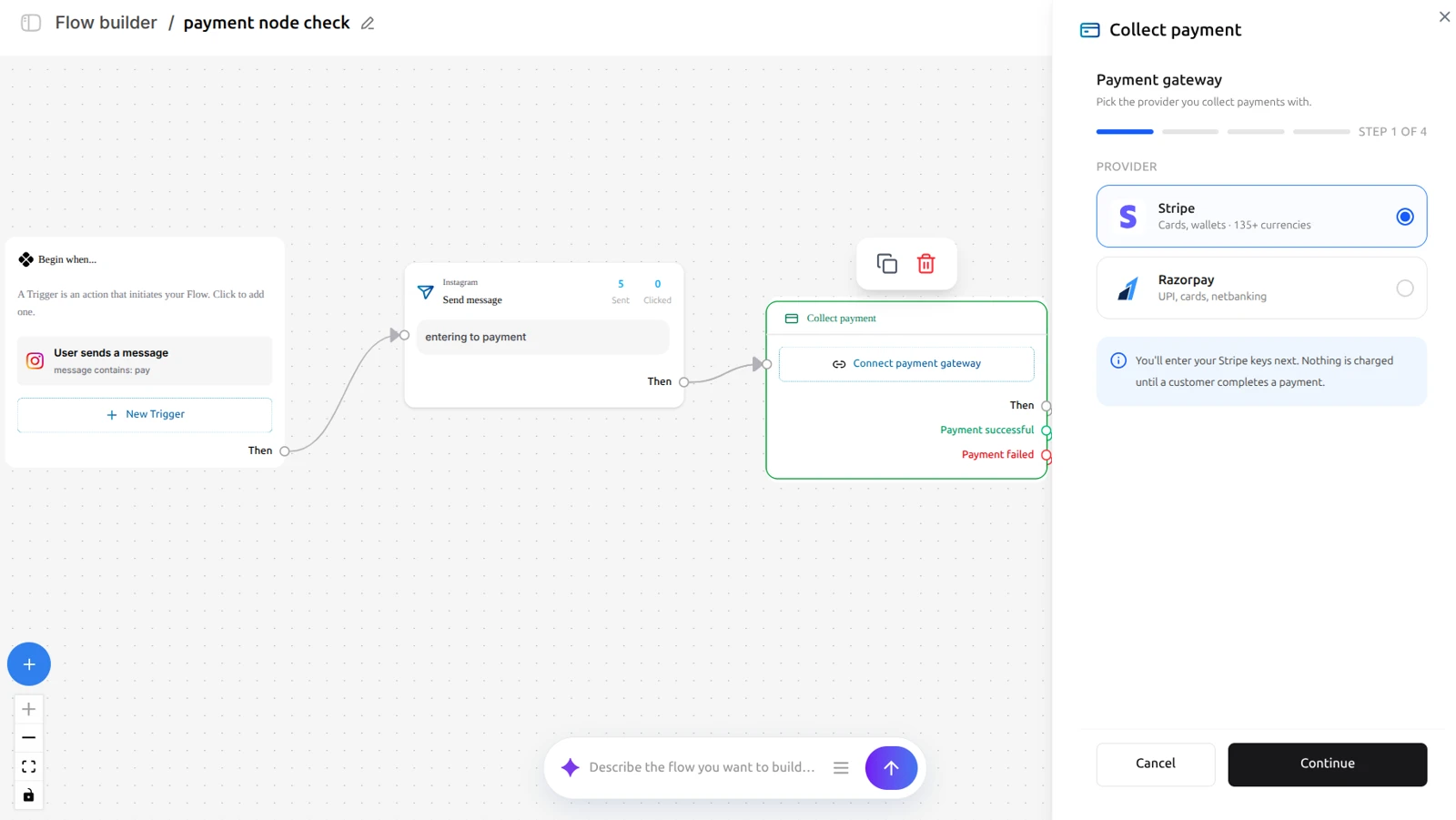
Next, add the payment. Drop in a Collect payment step and connect Stripe or Razorpay. You paste your API keys once, and every future flow reuses them. Set the price and the product name the buyer will see at checkout.
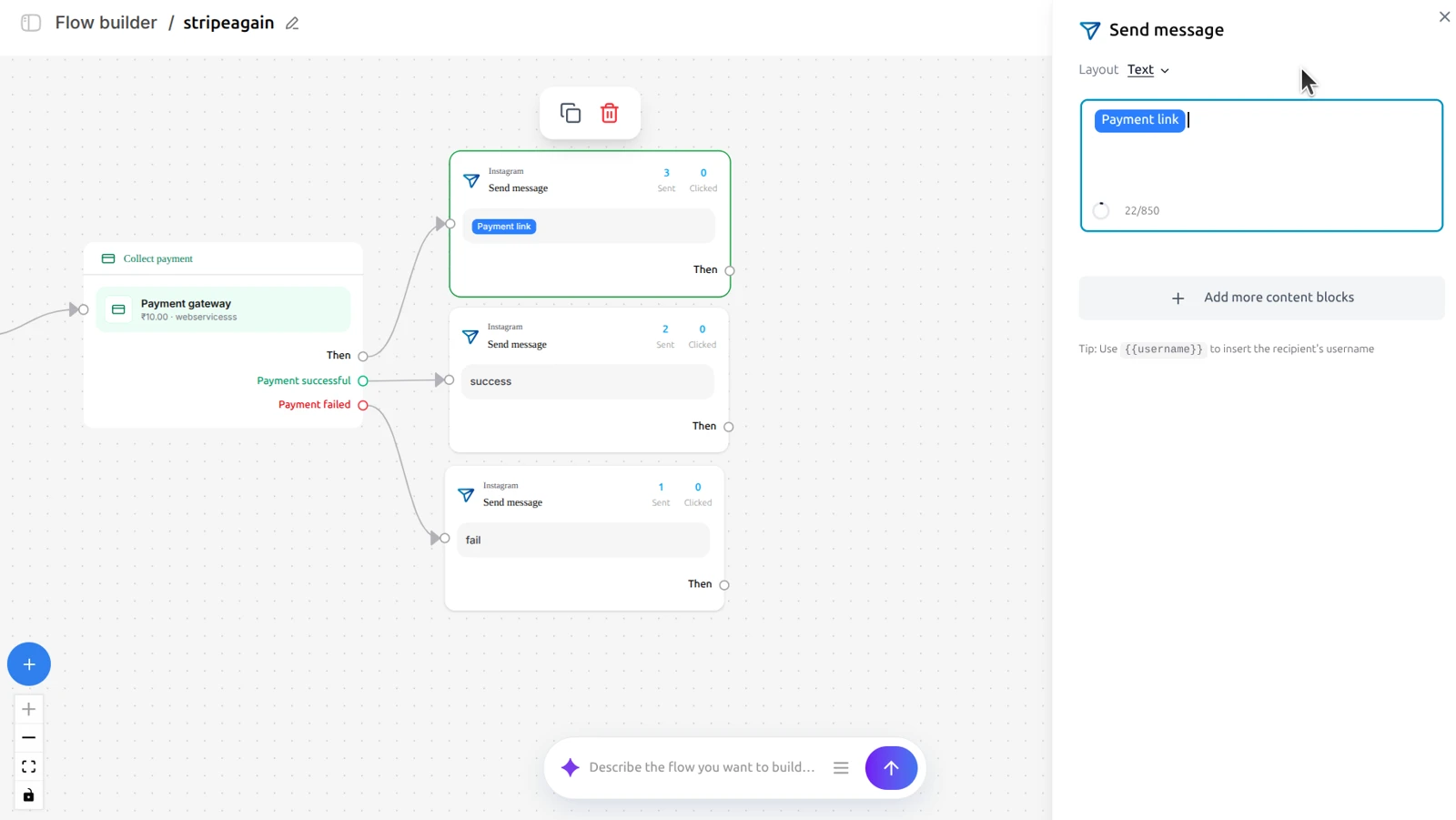
Now the one step almost everyone misses. The payment step creates the link, but it doesn't send it. You add a message after it and drop the link in by typing {{ and picking Payment link. Skip this and the flow runs perfectly, and nobody ever sees a link.
Finally, decide what happens next. The payment step has two more outputs: Payment successful, where you deliver the product, and Payment failed, where you send the link again. Wire both, test the whole thing with test keys from a second Instagram account, and switch it on.
Want the click-by-click version with every setting explained? → Read the full Payment node setup guide
The Part Most Sellers Skip: Keeping Records
Getting paid is half the job. The other half is knowing who paid, for what, and making sure they got access. Your Stripe or Razorpay dashboard shows the money. It doesn't show the Instagram handle, or whether the buyer is now inside your course.
This is where Zapier comes in. Zapier is a tool that connects apps that don't talk to each other, like Google Sheets, Notion, Mailchimp, HubSpot, Discord and thousands more. LinktoDM has its own app in Zapier's directory, so anything that happens in your DMs can flow straight into the rest of your business.
The trick is to label every buyer. On the Payment successful path, add a tag like preset-buyer, or save what they bought into a field like last_purchase. LinktoDM sends that to Zapier instantly, and Zapier does the rest:
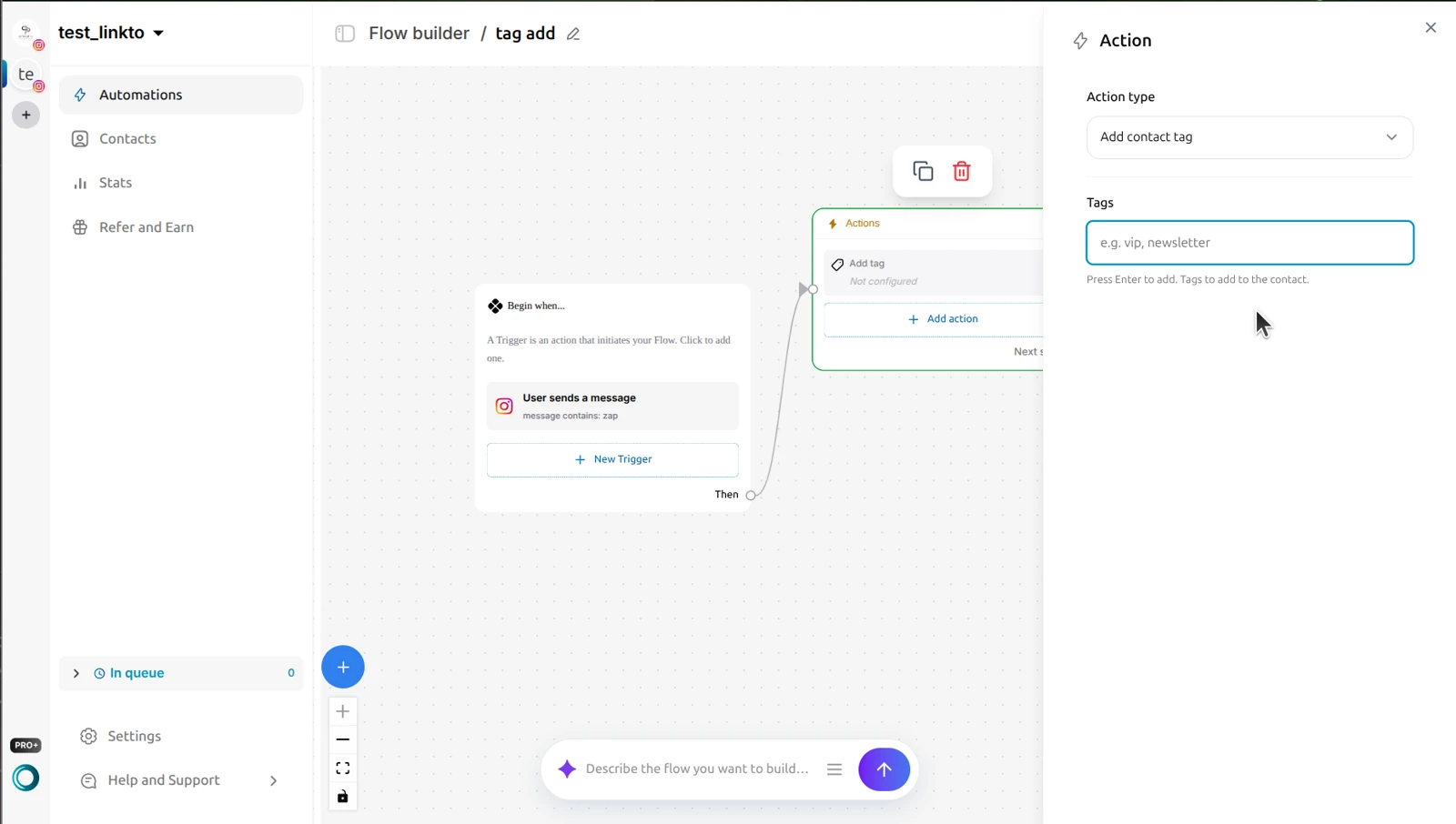
- An order log that fills itself. Every sale becomes a row in Google Sheets with the buyer's username, name and what they bought.
- Access that arrives on its own. A
course-paidtag adds them to your course platform or Discord community. - Plans and memberships that stay in sync. When the tag comes off, for example when a membership ends, Zapier can revoke their access too.
- A buyer list you own. Ask for their email in the flow, and paying customers land in your email tool or CRM, tagged by product.
On the Zapier side, you pick LinktoDM as the app and choose what should start the Zap. For sales, that's usually New Tagged Contact. When a membership ends, it's Contact Tag Removed.
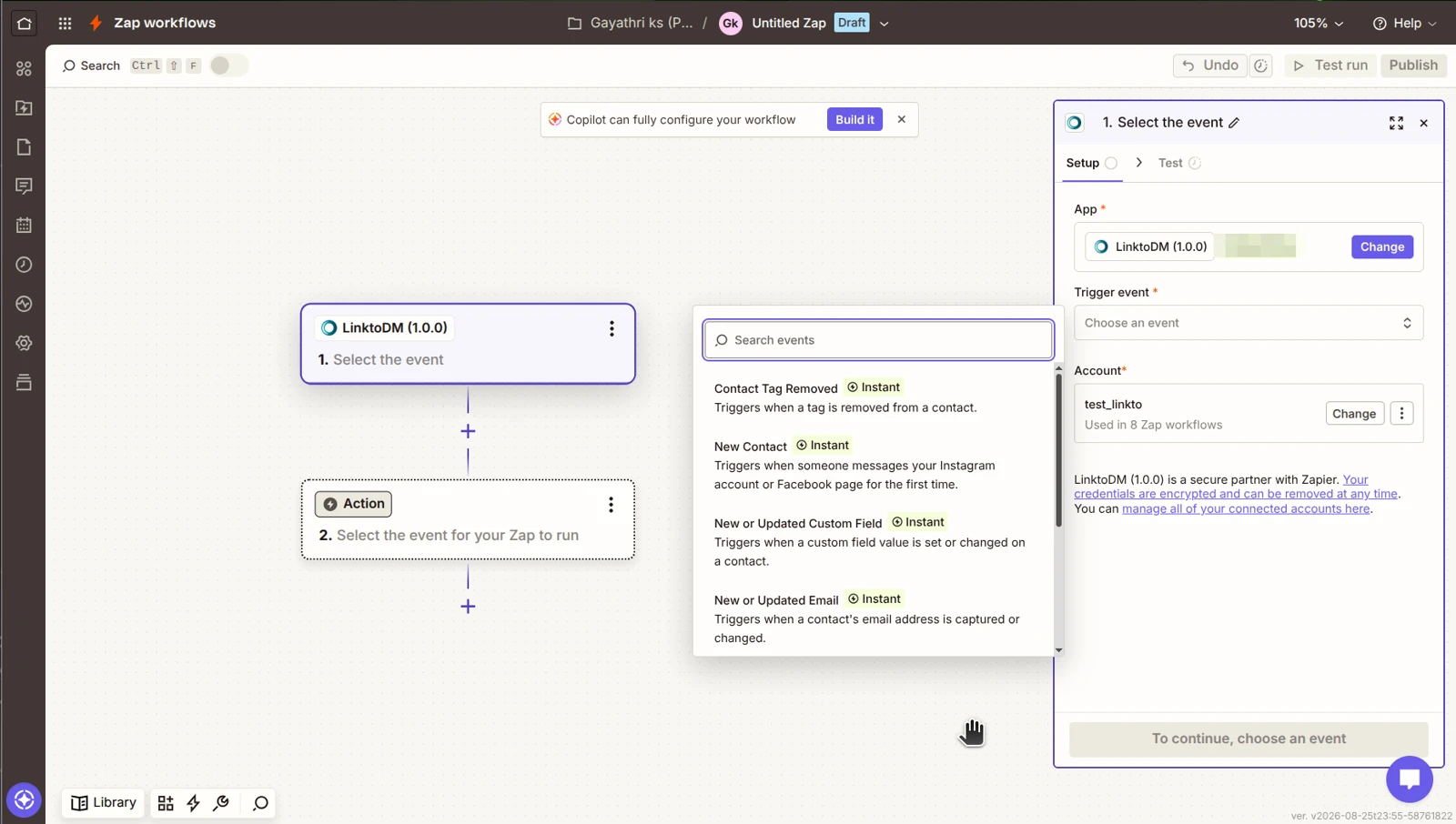
Then you choose the app on the other end, and map the tag and the buyer's details into it. The tag's name comes through with every event, so one Zap can handle several products.
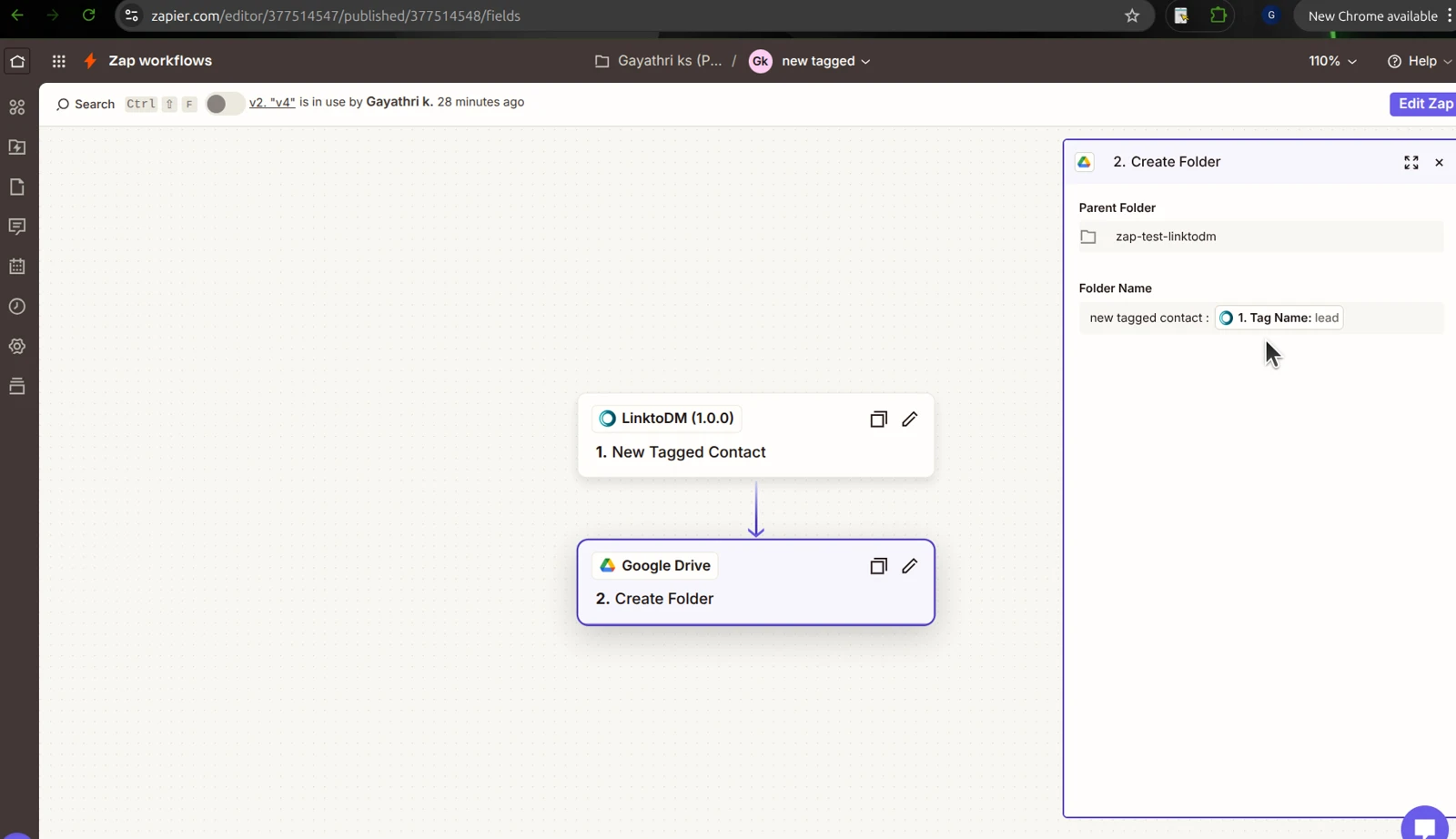
For the step-by-step setup, see triggering Zaps when contact tags change in the docs, or read how to capture Instagram leads and export them to a spreadsheet.
Put It Together: The Whole Machine
Here's what one product launch looks like when every piece is connected:
- 8:00pm. You post a reel: "Comment PRESETS for the pack."
- 8:01pm. Comments start. Each one gets a DM with the price and a payment link.
- 8:03pm. The first buyer pays with UPI. The download link arrives instantly, and they're tagged
preset-buyer. - 8:03pm. Zapier adds a row to your "Orders" sheet.
- Later that night. Anyone who didn't pay gets one friendly reminder, inside Instagram's 24-hour window.
- The next morning. You open your sheet and see every order, every buyer and every delivery. Done while you slept.
No screenshots to check. No links to send. No notebook. Just a reel, and a sheet full of orders.
Stripe or Razorpay?
- Selling mainly in India: Razorpay. Buyers pay with UPI in seconds, which is what most of them expect.
- Selling internationally: Stripe. Cards and wallets in 135+ currencies.
- Both: connect both, and use a separate flow for each market.
"But Will It Actually Work for Me?"
"Will buyers trust a payment link in a DM?" They asked for it. That's the difference from spam. And checkout happens on Stripe's or Razorpay's own secure payment page, the same one they've paid on a hundred times.
"Is automating this safe for my account?" LinktoDM is an official Meta Business Partner and runs on Meta's official Instagram API. Messages only go to people who commented, replied or messaged you first.
"I'm not technical." You build it once, and the steps above are all there is. On Pro+, the AI flow builder can draft the flow from a sentence like "when someone comments PRESETS, send the price and a payment link".
"What if they don't pay?" Failed payments get the link again automatically, and anyone who hasn't paid can get one reminder. After that, let them go. A buyer who feels chased stops being a buyer.
Which Plan Do I Need?
In-chat payments are part of LinktoDM's Pro+ plan, together with the AI flow builder, API access and more connected accounts.
Not ready yet? You can still sell on any plan, including Free, by sending a product link in the DM with a comment-to-DM automation. Buyers just pay on your website instead of in the chat.
Frequently Asked Questions
Can you sell directly in Instagram DMs?
Do I need a website to sell on Instagram?
Can customers pay with UPI on Instagram?
How do I keep a record of sales made in Instagram DMs?
Is it safe to take payments through Instagram DMs?
Can I sell digital products like presets, ebooks or courses?
What happens if a buyer's payment fails?
Which LinktoDM plan includes payments?
They Already Asked to Buy
Every "price?" in your comments is someone telling you they want it. Right now, how many of them reach the checkout depends on how fast you reply.
It doesn't have to. Build the flow once, connect your sheet, and let your next reel sell while you sleep. More than 22,000 creators already automate their Instagram DMs with LinktoDM.