




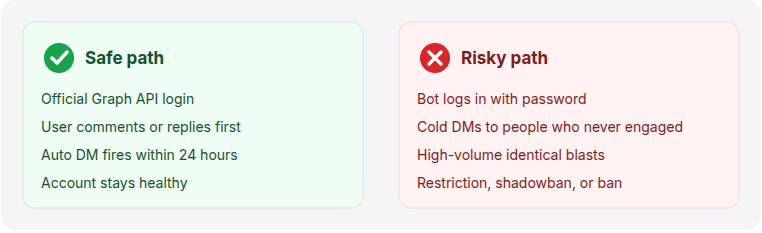
Yes, auto DM is safe on Instagram when two things are true: you use a tool built on Meta's official Instagram Graph API, and you only message people who interact with you first through a comment, story reply, or DM.
It becomes risky when you use unofficial browser bots, send unsolicited DMs to people who never engaged, or push past Instagram's 24-hour messaging window. The tool matters, but how you use it matters more.
- Safe: official Graph API tools, plus messages triggered by a real interaction.
- Risky: browser bots, cold DMs, and mass-messaging new followers.
- Your login stays safe with official tools. You log in through Meta, never hand over your password, and can revoke access anytime.
- LinktoDM is a Meta Business Partner built entirely on the official API.
The short answer: is auto DM safe?
Auto DM is safe for the vast majority of creators and brands, as long as you stay on the official rails. Instagram does not ban automation itself. It bans the spammy behavior that bad tools enable.
Meta runs an official partner program and a public Graph API precisely so businesses can automate replies. If you build on that, you are using Instagram the way Meta intends. The danger sits almost entirely with unofficial bots and cold outreach, which the rest of this guide breaks down.
Instagram is monitoring behavior more closely now
Over the past year, Instagram has tightened how it watches messaging. After a wave of suspension stories spread online, many creators assumed the automation tools were the problem. The more accurate read is that Instagram got better at spotting spam-like behavior, whoever or whatever produces it.
The platform now pays closer attention to patterns like these:
- Repetitive DM patterns and identical replies sent at scale
- The same trigger keyword used across every post
- Very high DM volume in a short window
- Spam reports from the people you message
- Aggressive trigger setups that fire constantly
- Engagement activity that looks automated rather than human
Here is the part that matters: automation by itself does not trigger suspensions. Behavior does. If you manually sent hundreds of repetitive, salesy DMs, Instagram could flag you just the same. It judges the pattern, not whether a tool was involved.
So the goal is simple. Your automation should behave like a helpful human assistant, not a spam bot. Everything below is built around that idea.
What actually makes auto DM safe or risky
It helps to stop thinking about "auto DM" as one thing. There is a safe version and a risky version, and they barely resemble each other.
- Browser bots that log in with your password and mimic taps
- Mass-DMing every new follower automatically
- Cold outreach to people who never engaged with you
- Ignoring the 24-hour reply window
- Identical messages blasted at high volume
- Tools built on Meta's official Graph API
- DMs triggered by a comment, story reply, or keyword
- Replying inside the 24-hour window
- Reasonable volume that ramps up gradually
- Message variations that read like a human
If your setup sits entirely in the green column, you are doing what thousands of compliant creators do every day. For a safe, step-by-step walkthrough, see our guide on how to set up auto DM on Instagram.
Official Instagram API vs unofficial bots
This is the single biggest safety factor, so it is worth seeing side by side. The difference is not cosmetic. It changes whether Meta treats the tool as approved or as a threat.
| Factor | Official Graph API tools | Unofficial browser bots |
|---|---|---|
| How it connects | Meta's authorized login (OAuth) | Logs in using your password |
| Meta's stance | Approved and supported | Against Instagram's terms |
| Who you can message | People who interact first | Tries to message anyone, including cold users |
| Account risk | Low when used correctly | Restriction, shadowban, or ban |
| Your password | Never seen or stored | Often stored on their servers |
Rule of thumb: if a tool asks for your Instagram password instead of sending you to Meta's login screen, treat it as unsafe.
The password is only part of it. Unverified tools also tend to skip the safety machinery that keeps you compliant:
- Rate-limit management
- A smart queue that paces your sends
- Natural delay handling between messages
- Spam-prevention safeguards
- API-compliant infrastructure
Verified Meta Business Partners are built with these by design, which is a big reason they stay safe even at higher volumes. This is also where most "automation got me banned" stories begin: not with automation, but with a tool that had none of these guardrails.
Instagram's auto DM rules you need to follow
Meta's messaging rules are simpler than they sound. Five of them cover almost everything that keeps your account safe. Official tools enforce most of these for you automatically.
1. Message people who interact first
You can only auto DM someone after they act: a comment on your post, a reply to your story, or a message to you. There is no compliant way to DM cold users who never engaged. This single rule prevents most spam reports.
2. Stay inside the 24-hour messaging window
Once someone interacts, Meta's standard messaging window gives you 24 hours to reply with automation. After that, the API simply will not deliver a standard message. Official tools track this window for you, so you do not have to think about it.
3. Respect the rate limit (around 200 DMs per hour)
Most official tools pace sends at roughly 200 automated DMs per hour per account. This is a safety convention the tools enforce, not a number Meta publishes, and it keeps you well under Instagram's real per-second API limits. If a viral post sends 500 people to your DMs, a good tool queues the overflow into the next hour instead of blasting all at once.
4. Keep messages relevant and varied
Identical messages sent hundreds of times are the clearest spam signal there is. Match the message to what the person asked for, and rotate two or three variations so every DM does not read word for word the same.
5. Never share your password
Meta's terms prohibit handing your login to third-party tools. A safe tool connects through Meta's OAuth screen and never sees your password. Anything that asks you to type your Instagram password directly is breaking the rules on your behalf.
What can get your account flagged or banned
Accounts rarely get banned for using automation. They get banned for patterns that look abusive. Watch for these:
- Using a browser bot or any tool that asks for your password.
- Sending unsolicited DMs to people who never engaged with your content.
- Posting the exact same link and message hundreds of times with no variation.
- Spinning up automation on a brand-new account with no history.
- Promising one thing in your caption and delivering something unrelated in the DM.
Most "I got banned by an auto DM tool" stories trace back to one of these, not to automation itself. Avoid the list above and your account stays in good standing.
How to check if an auto DM tool is safe
Since the tool is the biggest factor, vet it before you connect it. Run through these signals first. A safe tool hits the green list and none of the red.
- Connects through Meta's "Log in with Facebook" screen
- Never asks for your Instagram password
- Shows a Meta Business Partner or Tech Provider badge
- Paces and queues sends with a visible rate limit
- Transparent monthly pricing and real reviews
- Asks for your Instagram username and password
- Promises "unlimited DMs" or "undetectable" sending
- Runs as a browser extension that mimics taps
- A cheap one-time "lifetime" payment
- No mention of rate limits or the official API
One quick test settles most cases: if connecting the tool sends you to Meta's login instead of asking for your password, it is using the official API. If it wants your password, walk away.
How to auto DM safely (a quick checklist)
Staying safe is mostly about a few good habits. Follow these and your risk stays low:
- Pick an official-API tool. Confirm it connects through Meta's login, not your password.
- Trigger on interactions only. Set keyword, comment, and story-reply triggers, never cold sends.
- Vary your trigger keywords. Use different words on different posts instead of the same one everywhere, so your activity looks natural.
- Keep messages human. Add a few reply variations so every DM is not identical.
- Deliver what you promised. If the caption offers a guide, the DM sends the guide.
- Keep volume realistic. Ramp up gradually instead of blasting thousands of DMs at once.
- Respect the Community Guidelines. No tool can protect an account that keeps breaking Instagram's rules or collecting spam reports.
- Watch your stats. If replies or sends look off, pause and review before pushing more volume.
What to do if your account gets flagged
Sometimes Instagram flags an account even when you are mostly compliant, often after a viral post or a cluster of spam reports. If that happens, act calmly and in order.
1. Pause all automation
Turn off your automations right away and stop sending for 48 to 72 hours. Keep posting normally so the account still looks active, just without automated DMs going out.
2. Find what triggered it
Check your Instagram notifications and your tool's dashboard for the cause: a sudden volume spike, spam reports, or a message that read as too salesy. You cannot fix a flag you have not diagnosed.
3. Fix the message and the volume
Before restarting, tighten your trigger words so they fire less broadly, rewrite messages to be helpful rather than pushy, and add reply variations. Lower your daily volume for the first week back.
4. Restart slowly
Switch one automation back on, watch it for a few days, and only then add more. A gradual ramp looks natural and rebuilds trust with Instagram's systems.
5. If you are suspended, appeal
A short block usually clears on its own within a day or two. For a full suspension, file an appeal through the Instagram Help Center, explain that you used an official-API tool, and be patient. Do not spin up a second account to dodge it, since that can make things worse.
Is your account login and data safe?
With an official tool, yes. You connect through Meta's authorization screen, the same way you would log into any "Continue with Facebook" app. You are never typing your password into the tool itself.
You grant specific permissions, such as reading comments and sending DMs, and nothing more. You can review or revoke that access at any time from your Instagram and Facebook settings. That is the core reason official tools are safe and password-based bots are not.
How LinktoDM keeps your account safe
LinktoDM is built entirely on Meta's official Instagram Graph API and is a Meta Business Partner, so every automation runs inside Instagram's rules by design. A few features exist specifically to protect your account:
- AI Meta Policy Check. Scans your flows and flags anything that could breach Meta's messaging policy before it goes live.
- Smart Queue Control. Paces your sends so activity never spikes into spam-like territory.
- Interaction-only triggers. Comment, story-reply, and keyword triggers keep you inside the compliant zone automatically.
- Official OAuth connection. You log in through Meta and we never see your password.
If you are weighing tools, our LinktoDM vs ManyChat comparison looks at how each handles safety and compliance.
Frequently Asked Questions
Has Instagram's stricter monitoring made automation unsafe?
Can you get banned for using an auto DM tool?
Does Instagram allow DM automation?
Will auto DM get my account shadowbanned?
Is it safe to connect a third-party app to Instagram?
How many auto DMs can I safely send per day?
Are ManyChat and CreatorFlow safe to use?
How many DMs per hour can I send on Instagram?
What happens if someone reports my DM as spam?
Can I use auto DM on a brand-new Instagram account?
What happens if I switch automation tools?
Related reading
- How to set up auto DM on Instagram (step by step)
- LinktoDM vs ManyChat: which is safer?
- The best ManyChat alternative for Instagram DM automation
- Grow your followers with LinktoDM
Disclaimer & sources
Disclaimer: Instagram and Meta are trademarks of their respective owners. LinktoDM is an independent tool built on Meta's official Instagram Graph API and is not affiliated with or endorsed by Meta beyond the Business Partner program. Platform policies and limits can change, so always check Instagram's current terms. Results vary by account, niche, and usage.
Sources: Meta Instagram Messaging Platform documentation, Instagram Community Guidelines, and Meta Platform Terms (accessed June 2026).

'%3e%3cpath%20d='M14.8156%200H1.18125C0.528125%200%200%200.515625%200%201.15313V14.8438C0%2015.4813%200.528125%2016%201.18125%2016H14.8156C15.4688%2016%2016%2015.4813%2016%2014.8469V1.15313C16%200.515625%2015.4688%200%2014.8156%200ZM4.74687%2013.6344H2.37188V5.99687H4.74687V13.6344ZM3.55938%204.95625C2.79688%204.95625%202.18125%204.34062%202.18125%203.58125C2.18125%202.82188%202.79688%202.20625%203.55938%202.20625C4.31875%202.20625%204.93437%202.82188%204.93437%203.58125C4.93437%204.3375%204.31875%204.95625%203.55938%204.95625ZM13.6344%2013.6344H11.2625V9.92188C11.2625%209.0375%2011.2469%207.89687%2010.0281%207.89687C8.79375%207.89687%208.60625%208.8625%208.60625%209.85938V13.6344H6.2375V5.99687H8.5125V7.04063H8.54375C8.85938%206.44063%209.63438%205.80625%2010.7875%205.80625C13.1906%205.80625%2013.6344%207.3875%2013.6344%209.44375V13.6344Z'%20fill='%23B1B1B1'/%3e%3c/g%3e%3cdefs%3e%3cclipPath%20id='clip0_6304_15414'%3e%3crect%20width='16'%20height='16'%20fill='white'/%3e%3c/clipPath%3e%3c/defs%3e%3c/svg%3e)

